Terminal commands
By adding the "Inputs - Terminal Commands" block, it is possible to transmit all terminal commands via the fieldbus interface as well. The following signals are available for the terminal commands.
| Signal | Byte / Bit | Description |
| Execute command | 0.0 | With a rising edge on this bit, an attempt is made to execute the following command. |
| Terminal Command | 1 - X | Here the command is transferred as a string. The available commands can be found under Terminal commands. |
Information: Spaces and NULL characters (0x00) are ignored at the beginning and end of the command.
Information: In contrast to the serial or Ethernet terminal, the terminal command on the fieldbus interface does not require a line termination.!
 Message

|
This parameter defines the formatting of the response to the GetData command. |
| Remove unknown tags | If this option is active, unknown placeholders are removed from the ‘GetData’ query |
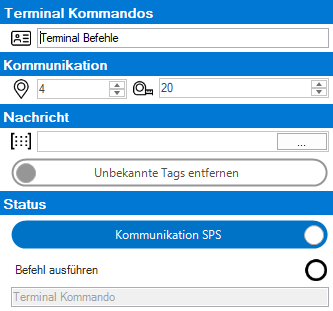
In the field "Terminal commands" a name of the block can be assigned.
Under "Communication" you can define the start byte in the data area of the interface. The data length is inserted with 20 bytes as default value, but can be changed (depending on the terminal commands used, a larger data area may be recommended)..
In the field "Status" you can see the current status of the signals or you can bypass the signal flow from the controller and control the individual commands yourself. Here as an example the program with the number 2 in the station 0 is loaded with the command SetJobByNumber:
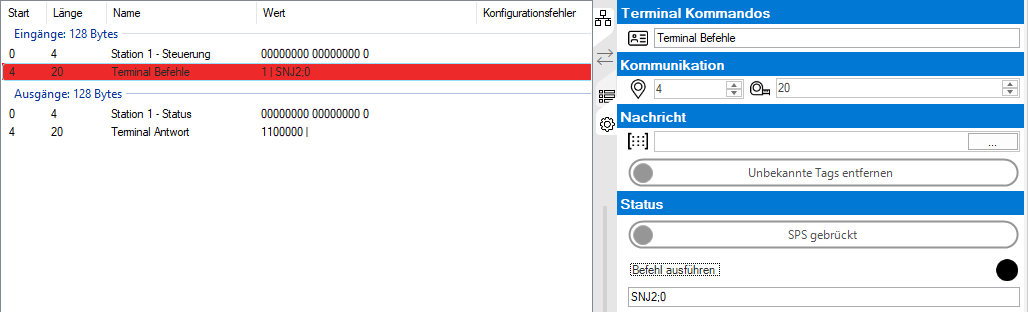
Mit dem Einfügen des Bausteins wird zugleich auch bei den Ausgängen ein Baustein mit dem Terminal Status eingefügt.
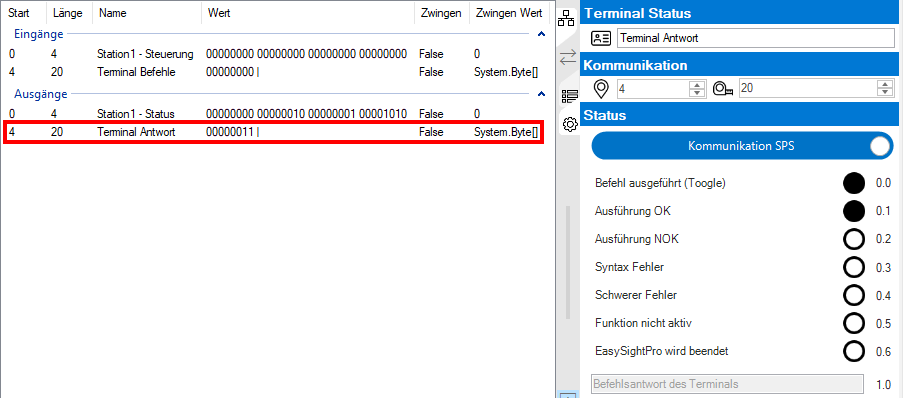
The following signals are available at the terminal status.
| Signal | Byte / Bit | Description |
| Command executed (Toggle) | 0.0 | A change in the state of this bit (toggle) signals that the desired command has been executed |
| Execution OK | 0.1 | Command was processed successfully |
| Execution NOK | 0.2 | Execute not successful |
| Syntax error | 0.3 | Incorrect syntax |
| Serious error | 0.4 | Serious error during execution |
| Function not active | 0.5 | Function not active or manually deactivated |
| EasySightPro will be terminated | 0.6 | EasySightPro® will be closed |
| Command response | 1 - X |
Information: In contrast to the serial or Ethernet terminal, the command response on the fieldbus interface does not contain an acknowledgement code, since this is mapped via the individual signal bits!
A name of the block can be assigned in the "Terminal Status" field.
Under "Communication" you can define the start byte in the data area of the interface. The data length is inserted with 20 bytes as default value, but can be changed (depending on the terminal commands used, a larger data area may be recommended)..
In the "Status" field, the current status of the signals can be seen, or the signal flow to the controller can be bridged here and the individual signals themselves can be controlled..